

Training the Model
We trained our first expert model in Kubernetes kubectl commands using a fine-tuning process on a specialized dataset. The dataset consists of structured prompt-command pairs where natural language queries are mapped to their respective kubectl commands. This allows the model to generalize and generate accurate kubectl commands for a variety of Kubernetes management tasks.
Why Fine-Tune a Model for kubectl?
General-purpose AI models lack deep Kubernetes knowledge and struggle with domain-specific queries. Our goal is to fine-tune a model that can:
Generate correct
kubectlcommands based on natural language input.Explain command syntax and usage with step-by-step reasoning.
Identify potential errors and suggest fixes.
Our Decision-Making Process
Model Selection: We use LLaMA 3.2-3B-Instruct, which balances efficiency and accuracy. It runs efficiently with 4-bit quantization, making it feasible for fine-tuning on consumer-grade GPUs.
Fine-Tuning with Unsloth: We streamline model training with LoRA adapters, reducing memory usage and improving efficiency.
Dataset Curation: We use multiple datasets to cover different aspects of
kubectlusage:Basic Commands: ComponentSoft/k8s-kubectl
Advanced Scenarios: ComponentSoft/k8s-kubectl-35k
Chain-of-Thought (CoT) Explanations: ComponentSoft/k8s-kubectl-cot-20k
Instruction-based Training: sozercan/k8s-instructions
Troubleshooting & Debugging: eliashasnat/k8s-qa
Deployment with Ollama: Ollama was selected for easy packaging and distribution, making it seamless to integrate into terminal-based applications.
Training Process
Dataset Collection: We compiled a comprehensive dataset of
kubectlcommands mapped to natural language queries, covering a wide range of Kubernetes operations.Preprocessing: We cleaned and structured the data to ensure consistency, removing redundant entries and normalizing formatting.
Fine-Tuning: We optimized the model using instruction-tuning techniques, allowing it to generate precise
kubectlcommands from user queries.Validation: The trained model was rigorously tested against various Kubernetes scenarios to ensure accuracy and reliability.
Deployment: The final model was packaged as
niradler/k8s-operator:latestfor easy use within the KasK application.
Integrating the Model into KasK
KasK - Kubernetes Assistant Terminal App
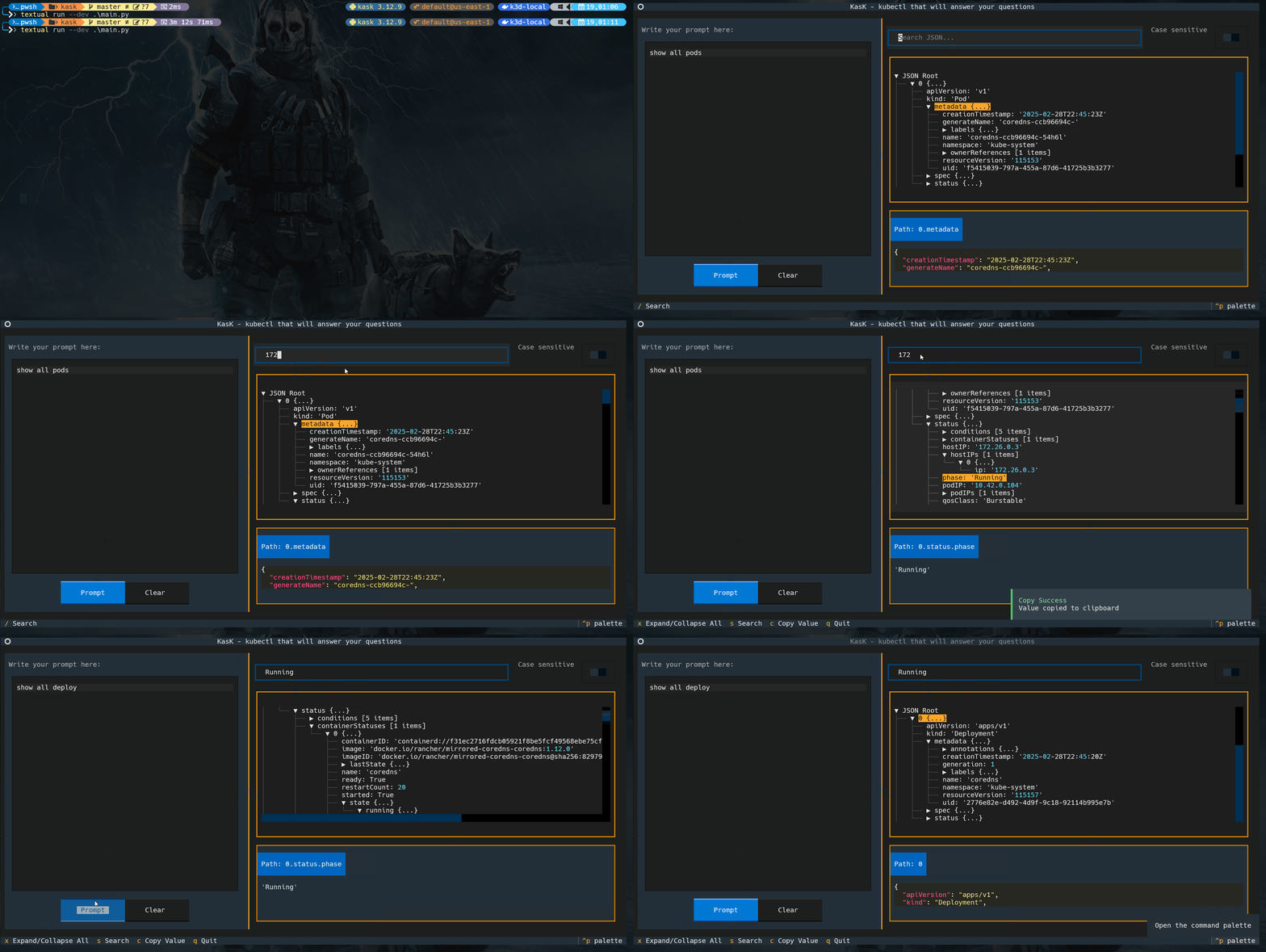
KasK is an open-source terminal-based application designed to simplify your interaction with Kubernetes clusters. With KasK, you can ask natural language questions about your Kubernetes resources, and it will generate accurate kubectl commands to fetch the required details. The app also provides a JSON viewer to display and explore the command output in a structured and user-friendly way.
Features
Natural Language Queries: Ask questions like "Show all running pods" or "List services in all namespaces," and KasK will generate the appropriate
kubectlcommand.JSON Viewer: View the output of
kubectlcommands in a tree-like structure with search and filtering capabilities.Clipboard Integration: Copy selected JSON values to your clipboard for easy sharing or further use.
Dark Mode Support: Enhanced readability with dark mode styles.
Keyboard Shortcuts: Navigate and interact with the app efficiently using intuitive key bindings.
Usage
git clone https://github.com/niradler/kask.git
cd kask
pip install -r requirements.txt
python main.py
Write your query in the "Write your prompt here" text area. For example: Show all pods in the default namespace.
Click the "Prompt" button or press Enter to generate the kubectl command and view the output.
Use the JSON viewer to explore the output:
Search for specific keys or values.
Expand or collapse nodes.
Copy selected values to your clipboard.
Use keyboard shortcuts for quick actions:
x: Expand/Collapse all nodes.sor/: Focus on the search bar.c: Copy the selected value.q: Quit the application.
Requirements
Python 3.8 or higher
Ollama server with the
niradler/k8s-operator:latestmodel:Use the Modelfile
ollama create k8s-operator -f Modelfile
kubectlinstalled and configured to access your Kubernetes cluster.
Features for the future:
Limit commands (read-only) or review before execution.
Compact table view.
Tools integration.
Chat memory.
Model selector.
Ollama configuration.
UI/UX improvements.
Submit prompt with keyboard.
With our first fine-tuned model powering KasK, we’re excited to continue improving Kubernetes management through AI-driven automation! 🚀
About the author
HI there 👋
I'm Nir Adler, and I'm a Developer, Hacker and a Maker, you can start with me a conversation on any technical subject out there, you will find me interesting.
Comments
Join the discussionNo comments yet. Be the first to comment.


