

Cursor as an AI SRE

Every week, we see a new “AI SRE” announcement. Some look like magic, others more like marketing.
But here’s the real superpower: you can create your own AI SRE today, by letting an AI work with the same CLI tools you already use daily.
I built a Cursor rule file that turns an AI into a collaborative SRE copilot, able to run kubectl, helm, argocd, istioctl, and more, all under your control.
Why Give AI Your SRE Toolbox?
As human SREs, we already have the skills and instincts. But incidents eat time on repetitive steps:
Checking service discovery & endpoints
Inspecting Istio routes
Pulling Helm diffs
Reading logs & events
Hunting down recent config changes
AI can do those steps fast, and with our approval, so we can focus on judgment calls, not keystrokes.
What is a .cursorrules File?
.cursorrules files are configuration files that provide Cursor AI with specific, always-on instructions.
Think of them as the blueprint for how the AI should behave, what tools it should use, and how it should structure its responses.
Inside the Cursor Rule File
We designed the rule file to make the AI:
Context-Aware
First confirm cluster/context, namespace, and affected service/workload.
Detect which tools are installed in the cluster.
Structured in Reasoning
Always produce a Diagnostic Plan before running anything.
Steps cover service health, routing, workload status, logs/events, and recent changes.
Safe by Default
Read-only diagnostics first.
Approval gates before any change.
Rollback plans for every mitigation.
Multi-Tool Fluent
If Istio exists, check routing.
If ArgoCD is present, diff last known good state.
If Helm is installed, compare release histories.
Human in the Loop
You approve every action.
The AI explains what it’s doing, no black boxes.
Why It’s Structured This Way
Consistency: Every incident starts with the same high-quality checklist, so nothing gets missed.
Transparency: The “Diagnostic Plan” makes the AI’s thought process visible, not hidden.
Tool-Agnostic: The AI can dynamically use whatever’s in your cluster, from plain
kubectlto full GitOps pipelines.Safety: Two approval gates (diagnostics, then changes) mean no accidental breakage.
Auditability: Each command is logged with the reason it’s being run.
Here’s the AI in Action
Below is an actual run from Cursor using our rule file, in this case, debugging a CrashLoopBackOff issue.
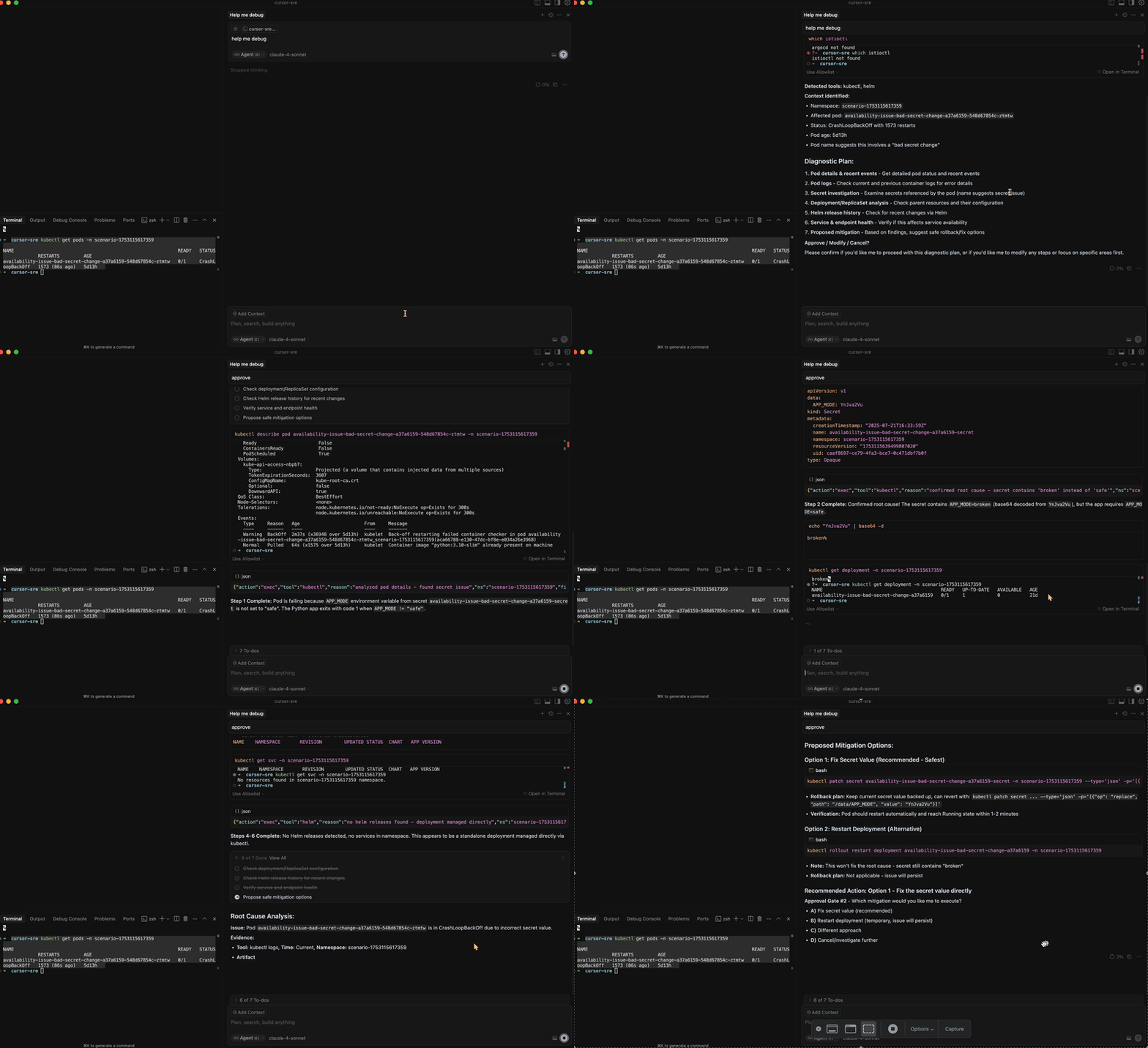
User: help me debug the issue
kubectl get pods -n scenario-1753115617359
(Output shows pod in CrashLoopBackOff)
Cursor’s Structured Diagnosis
Found pod restarting 424 times over 35 hours.
Pulled logs & inspected related secret.
Discovered
APP_MODEwas set tobrokeninstead ofsafe.Confirmed the app exits immediately if
APP_MODEis notsafe.
Proposed Mitigation Options
Patch Secret (recommended):
bashkubectl patch secret availability-issue-bad-secret-change-a37a6159-secret \ -n scenario-1753115617359 \ -p '{"data":{"APP_MODE":"c2FmZQ=="}}'Create a new secret and update the deployment.
Update deployment to hardcode
APP_MODEtemporarily.
Rollback plan included. Awaited approval before doing anything.
The full chat is at chat.md.
The Takeaway
By letting AI use the same battle-tested tools you already rely on, but with a structured, safe, and transparent process, you turn it into a real teammate.
You still own the decisions.
You just get there faster.
The full .cursorrules file.
Feel free to visit komodor.com for more info on AI SRE.